

Tuesday, 2 October 2018

Monday, 1 October 2018
Life Drawing; Year 3 - Session 1
It was really nice to have a break away from screens and be back doing some life Drawing. I still have a lot to learn with Life Drawing but it is a skill that I want to continue to improve on by doing it as much as possible.


Wednesday, 26 September 2018
Lost Boy: Rotoscoping - Initial Tests
After my meeting with Phil I think the best direction to go in with Lost Boy is essentially making the film twice as in to get the sketchiness that I am going for I will rotoscope over all the frames and for the parts where the exaggeration is dialled up I will 2D animate that part by rotoscoping over the 3D parts and compositing them in after effects by bringing down the opacity of the 3D elements. To get the 2D parts to mesh nicely with the 3D elements I will colour pick the texture of the characters once their textures are all laid out and use that to draw in the colour of the exaggerated parts, If needs be I can also use Maya to my advantage and use spheres put in place to help with motion capture for elements turning around.
These tests were done by using the generic male character and turning him around with a white background to represent the white space along with the Animators Toolbar by Patrick Deen which turns Photoshop into a nice little 2D animation package . As these are tests I kept everything very lose by adopting continues line that Vicky thought us in life drawing and didn't erase anything, this enabled me to just have fun with it and I really like when the black drawn in lines went over the boundary of the 3D model as it looks nice meshed against the white space background.
I am going to continue doing more exaggerating tests by morphing and bulging elements, drawing In the negative space around the character instead, animating the shadows, lighting tests and also start doing compositing tests in After Effects.


These tests were done by using the generic male character and turning him around with a white background to represent the white space along with the Animators Toolbar by Patrick Deen which turns Photoshop into a nice little 2D animation package . As these are tests I kept everything very lose by adopting continues line that Vicky thought us in life drawing and didn't erase anything, this enabled me to just have fun with it and I really like when the black drawn in lines went over the boundary of the 3D model as it looks nice meshed against the white space background.
I am going to continue doing more exaggerating tests by morphing and bulging elements, drawing In the negative space around the character instead, animating the shadows, lighting tests and also start doing compositing tests in After Effects.

Generic Male turnaround with Rotoscope

Rotoscope Line Work only
Monday, 24 September 2018
Lost Boy: Mrs Pratt's Art Room - Initial Tests in Maya
I have spent some time experimenting in Maya to try and translate the concept art from the art room into 3D. I started by getting random shapes in Maya and then laying out the UVs for all the objects and then unfolding them together, I then saved a UV snapshot and simply cropped out parts of the concept art and laid it over the top as a texture in photoshop. With some of the objects I messed around with the presets for the AIStandard in Arnold such as blood, gold and honey which gave some nice refractions to the objects. I also wanted the sketchyness of the concept art to translate too so I made a simple alpha map in photoshop of a brush with lots of texture and attached that to a sphere, with the second image I was trying to make an alpha layer but it didn't go to plan however I actually like the way that it looks, it didn't show up in the render but does in the perspective view.
I am going to continue experiments with the art room to get the feel of the concept art by adding a depth of filed pass to show some atmospheric perspective, adding more textured brushes as alpha maps and give a whirl of using render layers.

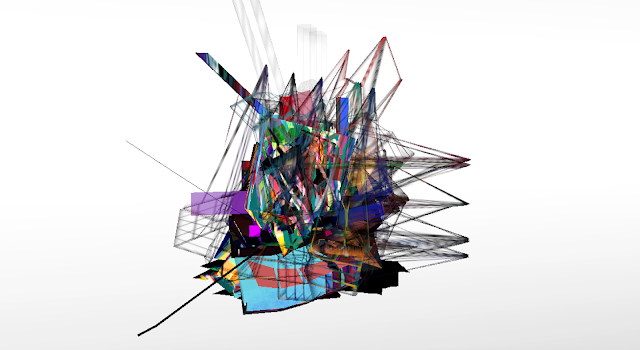


I am going to continue experiments with the art room to get the feel of the concept art by adding a depth of filed pass to show some atmospheric perspective, adding more textured brushes as alpha maps and give a whirl of using render layers.

Rendered Image

Screenshot of failed alpha map
Texture in Photoshop
Brush Stroke Alpha Map in Photoshop
Friday, 21 September 2018

Tuesday, 18 September 2018
Lost Boy: Mrs Pratt's Art Room - Concept Art
Over the summer I did a few more designs for the art room, going by what Alan said about suggesting things rather than actually having them in plain sight as it is more feasible with modelling, I like the idea of having the art room with mounds of objects, but having a hint of something art room related like an easel, desks or paintbrushes mended into the mounds, I think the mounds being different colours make it pop nice against the white background making it feel like an abstract painting while representing the multicoloured nature and free spirit of Mrs Pratt's art room, I think it feels almost kind of glitchy which I think represents memory nicely. I want to explore further with this concept art by creating and testing it in Maya.


Digital Paitning 1

Digital Painting 2

Traditional Watercolour Painting
Monday, 6 August 2018
Lost Boy: 2D Animated Experiments
The first two animations were tests with the melting one utilising the smudge tool in photshop, and with the second one I gave a whirl of morphing. The third and fourth animations I specified to the script of Lost Boy with the part "I felt like my eyes were bulging out of my head". I have been reading some books which include Timing for Animation by Herald Whitaker which is really starting to help me understand what makes a good 2D animation, it has a lot of the technical jargon of old-school cell animation that I want to learn including bar sheets, timing and spacing, anticipation, and animating in firsts or halfs. I have also been reading another book called Hybrid Animation by Tina O'Hailey which is helping me understand and think laterally about what I need to get the look of Lost Boy with a lot of examples of animations that have done a good job of juxtapositioning 2D with 3D.
Further to animating in photoshop I wanted to do some tests in After Effects. I rendered just the lines from photoshop as a .png sequence and brought these into after Effects to play around with. I think some of the effects could really capture the emotion that I am going for in that scene - by having the energy be in the line work,
To put what I am learning with 2D animation into effect with Lost Boy - I think my recipe will be as follows;
- Have the character models texture look sketchy/ illustrative,
- Render out the character doing its animation and if needs be render the background separately with passes.
- Import the render of the character into photoshop as frames
- Rotoscope over the frames by drawing in the linework in photoshop using the animator's toolbar,
- Export the drawn linework as a png sequence for transparency,
-Bring into after effects and if the emotion calls for it - add the effects that capture its essence - either on just the line work or the line work and the animated model.
Doing it this method with rotoscoping I think would really capture the style that I am going for with Lost Boy, it could be possible if I get the texture of the character model to look a lot like the designs to actually have parts of the animation be 2D - in that its not limited to just the linework, for example for the part where my head turns into a rocket I could 2D animate that part with the present Graeme talking before hand being animated in Maya and then having it switch to 2D. There is things I need to be wary of if going down this route - I have to make it leak seamless between the switch of 2D and 3D and not jarring for the audinece as I dont want the viewer thinking "what changed in this part", rather than being invested in the story.
I need to be really organised with Lost Boy especially with using my time efficiently as rotoscoping is very cumbersome to draw over every frame, which means I would have to have everything rendered with due time to draw over all the frames,
Next on the agenda...
- Start modelling the present Greame, followed by Young Graeme and Mrs Pratt,
- Start rethinkng parts of the stroy to amp up the exageration.
- Do desings, sketches, thumbnails of new story ideas
- I would like to continue with 2D animation and experiment with blending modes by adding the animated experiments here on top of each other, I would also like to
- Download a free trail of Twich by video Copilot to experiment more with 2D.
- 2D animate the head turning into a rocket
-
 |
| 1 Melt Morph - photoshop, Animators Toolbar |
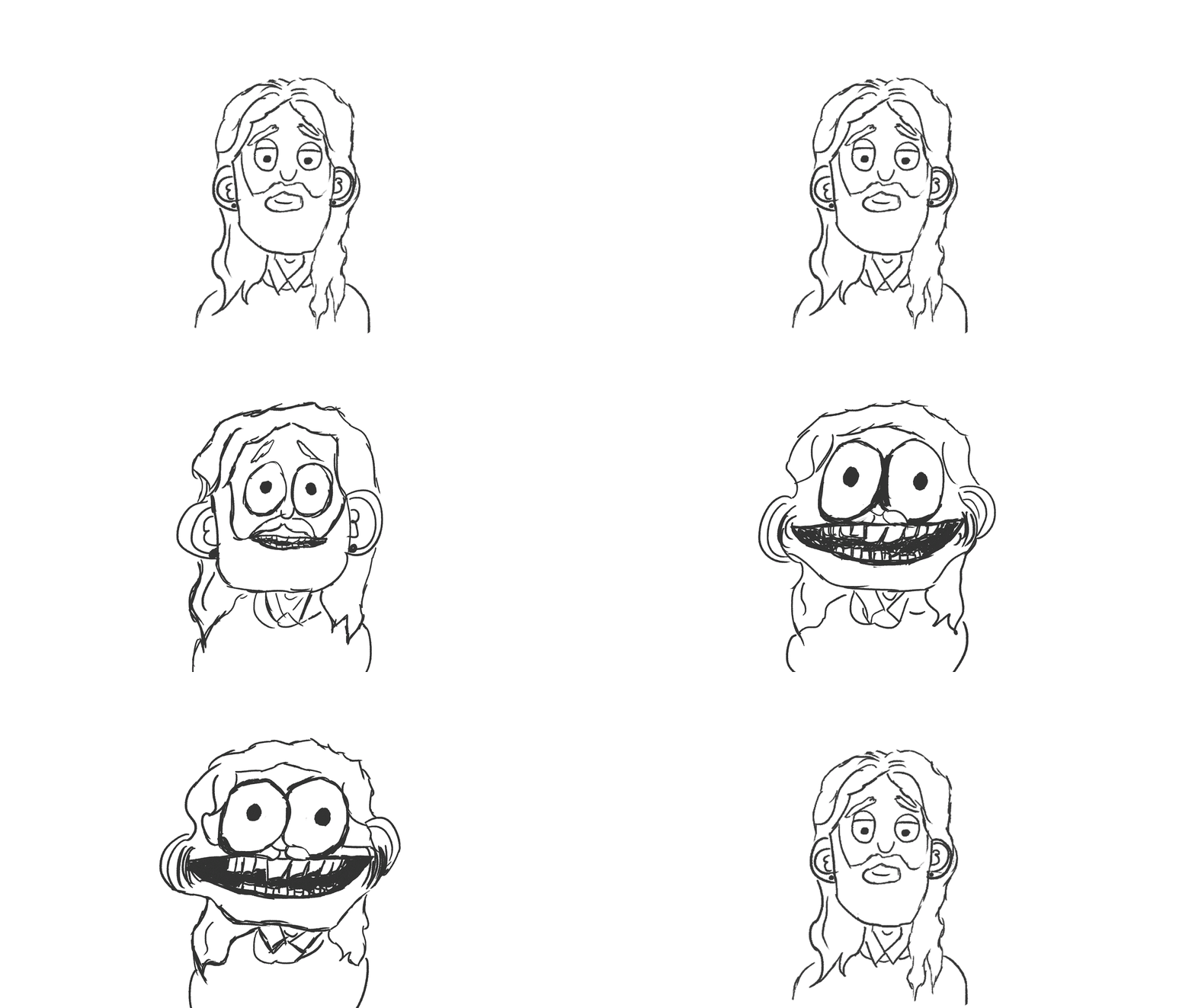 |
| 2 Crazy face morph - Photoshop. Animators Toolbar |
 |
| 3. "I felt like my eyes were bulging out of my head" Lines & Colour, Photoshop - Animators Toolbar |
 |
| 4: "I felt like my eyes were bulging out of my head" Linework Photoshop - Animators Toolbar |
 |
| 5: "I felt like my eyes were bulging out of my head" Photoshop - Animators Toolbar & After Effects - Wiggle Gelatin |
 |
| 6:"I felt like my eyes were bulging out of my head" Photoshop - Animators Toolbar & After Effects - Griddler |
 |
| 7: Photoshop - Animators Toolbar & After Effects - Displacment map with a scrathcy texture |
 |
| 8: "It was like a wave of axious energy" Photoshop - Animators Toolbar & After Effects - Ripple 1 |
 |
| 9: "It was like a wave of axious energy" Photoshop - Animators Toolbar & After Effects - Ripple 2 |
 |
| 10: "It was like a wave of axious energy" Photoshop - Animators Toolbar & After Effects - Ripple 3 |
 |
| 11: Photoshop - Animators Toolbar & After Effects - Turbulent-Displace 1 |
 |
| 11: Photoshop - Animators Toolbar & After Effects - Turbulent-Displace 2 |
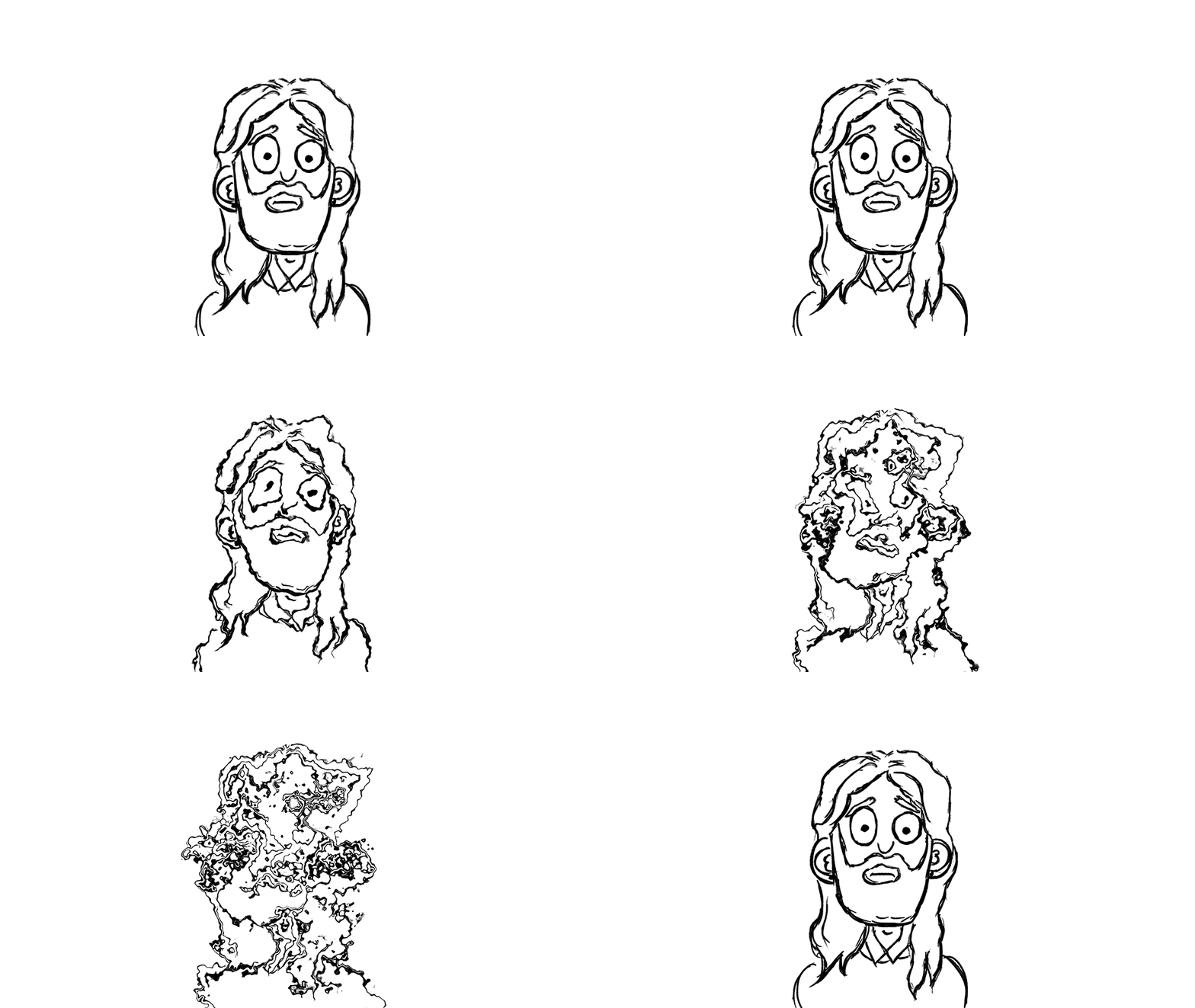 |
| 11: Photoshop - Animators Toolbar & After Effects - Turbulent-Displace 3 |
Monday, 18 June 2018
Lost Boy: Present Graeme - 2D Animated Turnaround WIP
As per Phil's advice during the Premise crit I have spent the past few days practising 2D animation with a turnaround animation of the present Graeme. I really want to practice a lot with 2D animation because I want to overlay this on top of the CG animation to give it a more scratchy, sketchy feel as I think it could add some nice dimension and texture to the film. This animation definitely needs more work - it's pretty clunky in parts - His hands are too small in some frames and the hair is challenging as the wavy parts need to match in all drawings to make it flow nicely. The feet were really difficult to understand in 3D so drawing a simple circle underneath the character really helped with animating them. I also had to edit a lot of my original static turnaround drawings as they did not animate well when overlaid on top of each other, I also need to do more in between keys and I am going to continue with this and add in more details such as a blink to really finesse it. If all goes well with 3D modelling I think it could look interesting to have a 3D turnaround showing the pipeline but also a 2D turnaround possibly meshed together.
I do feel a lot more comfortable using Photoshop rather than flash and following the video below by adding simple actions really equipped photoshop to be used as a useful animation tool. I am currently reading the book "Elemental Magic, The Art of Special Effects Animation" which is extremely useful and is teaching me a lot that I could incorporate into 2D animation such as smoke effects. I want to get to a place where I can work a lot more efficiently in 2D as this took way to long to accomplish, I do feel like I will get there slowly but surely. In the future I would like to animate small little snippets of lines from the script recording to match the different ideas that I have for the animation, keeping in mind the feedback of amping up the exaggeration. I am excited to learn more about 2D animation and I am thoroughly enjoying the process thus far.


Friday, 8 June 2018
Lost Boy: The Art Room - Concept Art
Using what Alan suggested, instead of showing too many intricate details in the art room which would be cumbersome to model, I have attempted to work on the art of suggestion by showing mounds of shapes toppled and tethering on top of each other which represent the crap that was strewn all over the art room, I am going give a whirl of trying different shapes and showing hints of actual objects stuck around the mounds such as desks, chairs, books, canvases, sculptures and so on, this would seem a lot more feasible in maya - I could fill the majority of the mounds with boxes and have planes scattered around, I quite like the look of them look see through so I will play around with the transmition in Arnold.


Subscribe to:
Posts (Atom)