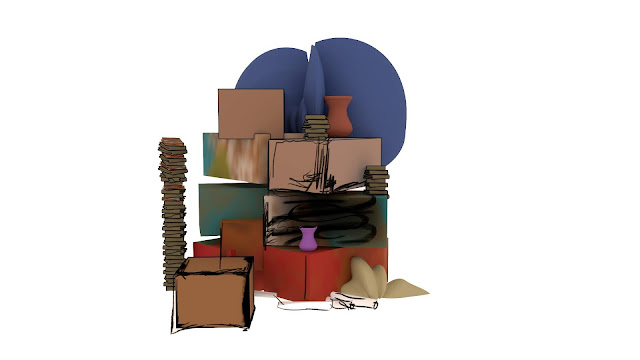
In between rigging and skinning my characters I have been working on the art room to try and get a more analogue feel that represents the vibe of Mr's Pratt's creative space. I used alpha maps to achieve the look as I thought it was a shame to disregard the previous alpha maps that made the art room look rather unfriendly so I softened their edges and bleached them out by saturating them with white.
I wanted to dial down the use of actual geometry in the art room as I want to be wary of render times because the previz version of the art room which has the camera movements locked and ready to use was very clunky to animate with, to compensate this I thought it would be interesting to take things further with alpha maps by making the random clutter look like backdrops from a soundstage by dialling up the fake-ness so that when the crane camera shot pans out to reveal the extent of the art room it would look like a miniature stopmotion soundstage, to achieve this look I used render layers to render out certain mounds of the art rooms bric a brac then saved those renders out and drew in extra scratchy texture, I then used this for the colour accompanied with it a alpha maps.
I like the idea of these cardboard like elements as in a way it feels like it was created by present Graeme with the guidance of Mrs Pratt and would also crank down render times and make animating a lot smoother, I decided to throw in some of my concept art pieces as alpha's also. I didn't like how the the alpha maps looked with an overhead establishing shot as they looked like they were just floating in the ether so I added some simple wooden slats to make it look like they are boarded in place.
Art Room Full Render 1
Art Room Full Render 2
Render Layers window with Bric a Brac Mound 4 in view
Bric A Brac 1 Rendered Image Colour for Alpha
Bric A Brac 1 Rendered Image Alpha
Bric A Brac 2 Rendered Image Colour for Alpha
Bric A Brac 2 Rendered Alpha
Painted Image 1 with Colour for Alpha
Painted Image 1 Alpha
Painted Image 2 with Colour for Alpha
Painted Image 3 with Colour for Alpha
Painted Image 1 Alpha
The Art Room Render From Above